
An AI assistant that answers occasional customer questions has different needs from a service handling requests all day. The right choice starts with the job, expected demand and who will look after the technology - not the biggest GPU.
A GPU is a powerful chip used to run many AI tasks. An AI model is the software that performs those tasks. An API is a connection that lets your application use an AI service without running the model itself.
What are you actually choosing?
With a managed AI API, you access a ready-to-use service. With shared or dedicated GPUs, you rent computing capacity and may need to manage the AI software yourself.
An API service can run on shared or dedicated hardware. The key questions are who operates the service and what capacity your workload requires.
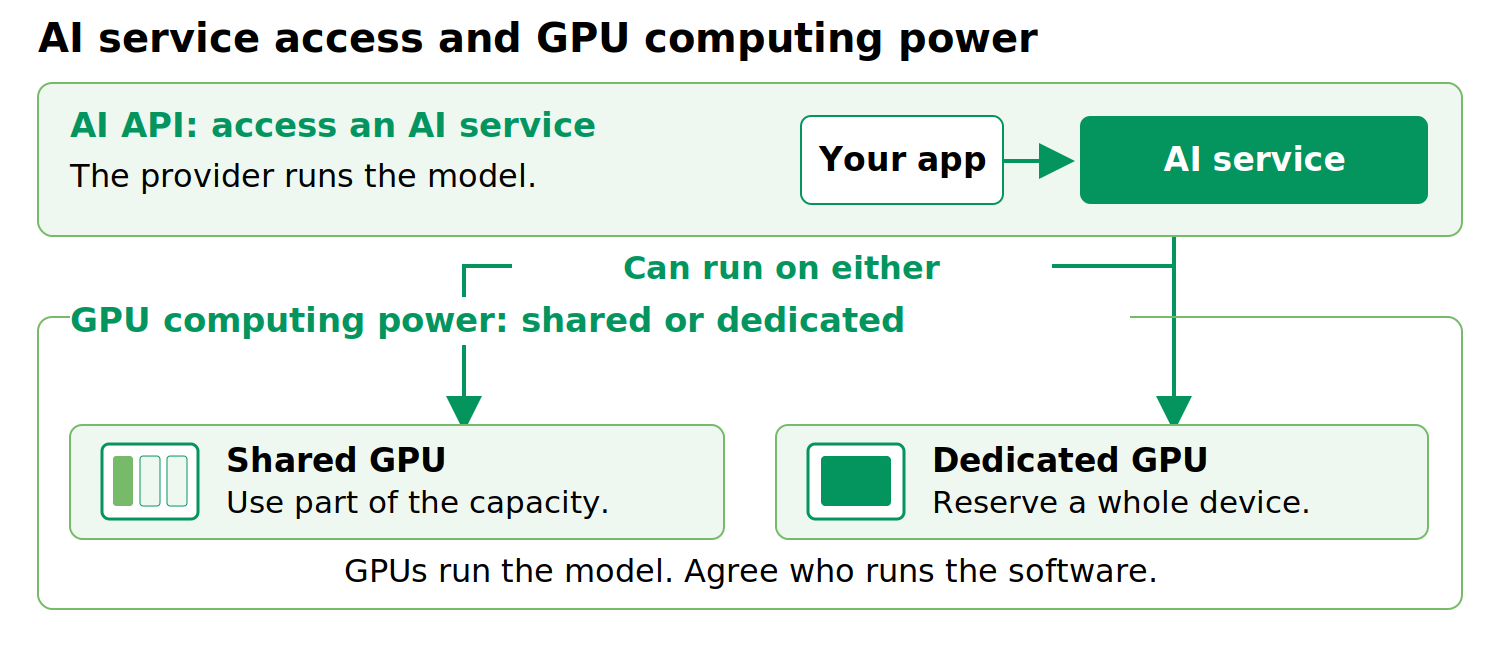
Figure 1. Two different decisions: the AI service you use and the GPU capacity beneath it.
Three ways to get started
Option 1: Use AI as a service
A managed API lets your team connect an application to a supported model. The provider runs the model; you remain responsible for the application, access permissions and checking whether its answers are good enough.
This can suit uncertain or uneven demand. Before committing, check usage limits, busy-period response times and what happens when the provider changes a model. Also ask where requests go, who can access them and how long data is kept.
Option 2: Share GPU capacity
Shared GPU services can allocate resources in different ways, including hardware partitioning or time-sharing. These approaches offer different levels of isolation and performance predictability. Ask the provider what resources are allocated to your workload and how other users may affect performance.
Sharing works in different ways. Some services provide a hardware-separated portion; others share processing time. These do not offer identical protection or performance. NVIDIA’s documentation distinguishes these approaches.
Ask how much memory and processing capacity you receive, whether other customers can affect your work, and who maintains the AI software. “Shared” alone does not tell you the answer.
Option 3: Reserve a GPU for your team
A dedicated GPU reserves a whole chip for your work, though not necessarily the whole server. It is worth considering for steady demand, larger models or applications that need a specially configured AI setup.
You still need someone to install, update, monitor and recover the software unless those services are included. A dedicated GPU is not automatically faster, more secure or legally compliant. Test the complete service, including what happens during a failure.
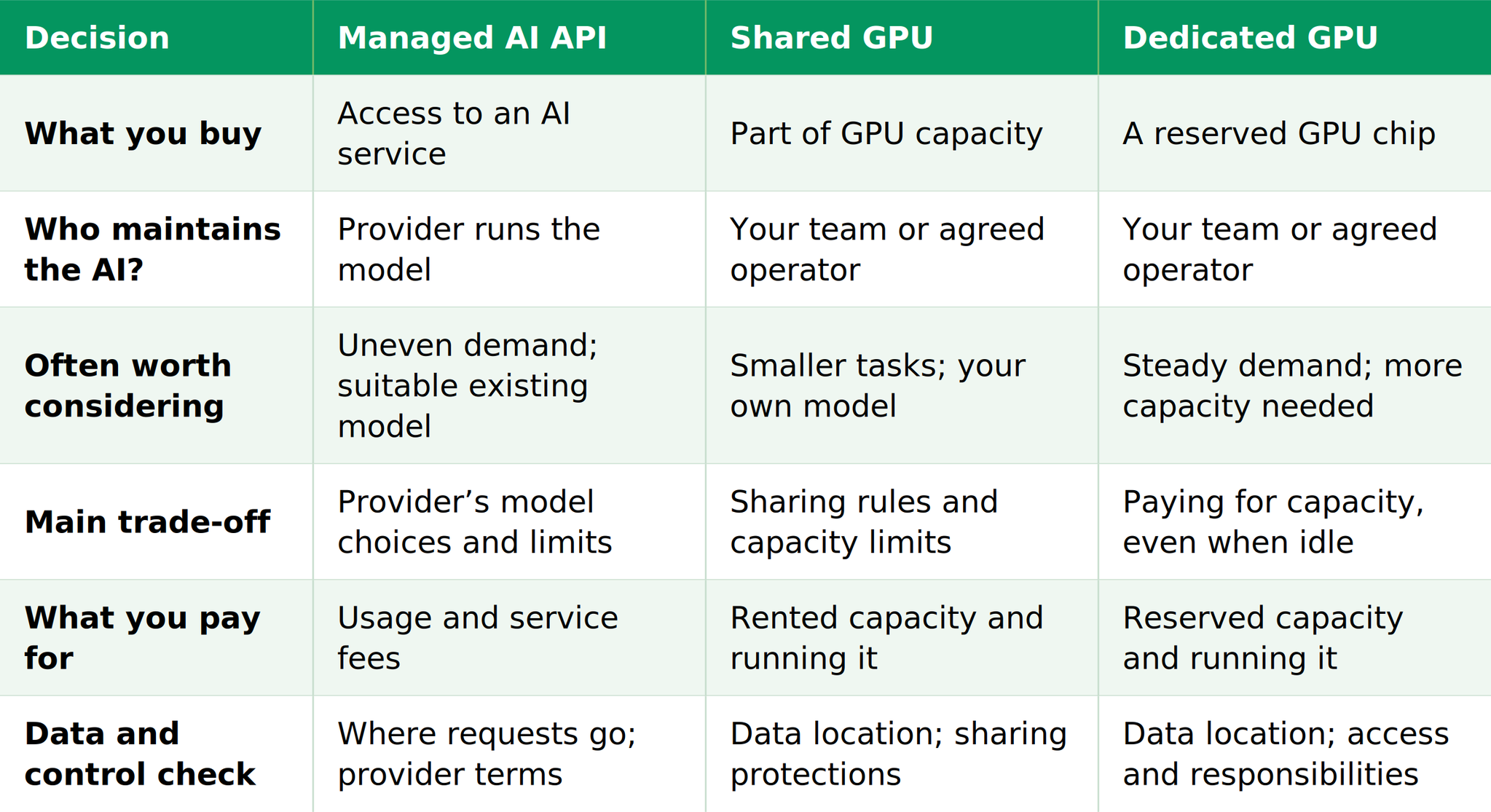
Compare the options at a glance
For the GPU options below, assume your team runs the AI software unless you buy a separate managed service.
Check what the job really needs
Start with useful answers, not technical specifications. Try real tasks and decide what quality is acceptable, how long people can wait and how many people may use the service at once.
Memory matters too. A model that fits on a GPU for one short request may need more memory for long documents or several simultaneous users. Ask your technical team or provider to check the full workload.
Timing changes the decision. Overnight processing can wait in a queue; a customer waiting for a live answer usually cannot. Test busy periods as well as a quiet demonstration.
Adapting or training a model can need different resources from simply using it. Check feasibility, software compatibility and model licences before renting capacity for that purpose.
Compare the whole cost
Compare options that deliver similarly useful results. A cheaper system is not a saving if staff must correct its answers or customers abandon it because it is slow.
Look beyond the headline price:
- API: usage charges, any tools or extra services, repeated requests and the work of building and maintaining your application.
- GPU: rented capacity, supporting computing and storage, network charges, software maintenance and staff time - including backup capacity if needed.
Consider how much capacity sits unused. A steady workload may justify a reserved GPU; occasional bursts may not. There is no single traffic level at which dedicated hardware becomes cheaper for every organisation.
Three everyday examples
These are illustrative situations, not customer stories or promised results.
1. A customer-help assistant with unpredictable demand. Start by evaluating an API if an available model answers well and meets your data requirements. Check whether it can handle busy periods without long waits.
2. Sorting documents every night. A small, predictable task uses a model suited to your business and can wait until morning. Shared GPU capacity may fit, provided it has enough memory and finishes on time.
3. An AI service used throughout the day. Your own model handles a steady stream of requests and users expect quick answers. Test dedicated capacity, but confirm the improvement and running costs before committing.
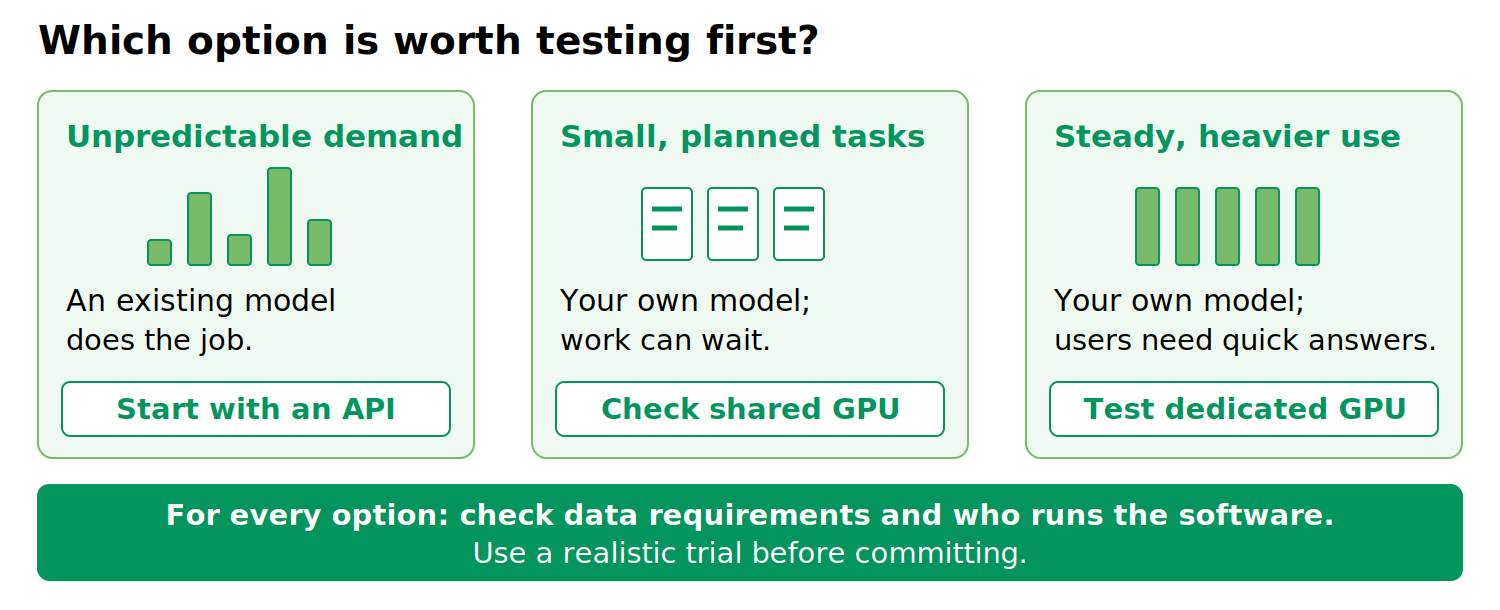
Figure 2. These are starting points for a trial, not fixed rules. Data requirements and software responsibilities matter in every case.
Five questions before you choose
What must the AI do well?
Define useful results and acceptable waiting times.
How busy will it be?
Include peaks, quiet periods and several users arriving together.
Who will keep it running?
Agree responsibility for updates, security, monitoring and recovery.
Where will the data go?
Check processing, logs, storage, retention and backup providers. An EU access point alone does not prove that every part of the service stays in the EU; check the contracts too.
What does a realistic trial show?
Compare answer quality, waiting times and the full cost of completing the task.
Discuss your AI workload with CloudSigma
CloudSigma’s platform describes GPU passthrough - direct GPU access for a virtual machine - and GPU slices. The configuration and sharing behaviour of a slice need to be confirmed for the selected deployment. Available options depend on the location, hardware and service arrangement. Confirm who runs the AI software before choosing.
CloudSigma AI Mission Control is a separate access and oversight layer for supported managed AI services and selected direct-provider connections. CloudSigma AI Mission Control provides an access and oversight layer for supported managed AI services and selected direct-provider connections. It supports policies governing model, supplier and region access, and tracks usage by project. Connecting customer-owned GPU capacity is a separate assisted onboarding process, with architecture, model-serving, security and operational review—not automatic self-service setup.
Ready to evaluate your AI deployment options? Talk to CloudSigma about your workload, expected demand, model requirements and data-location needs. Together, you can identify suitable options and agree on the next steps for evaluation.
Comments
No comments yet. Be the first.